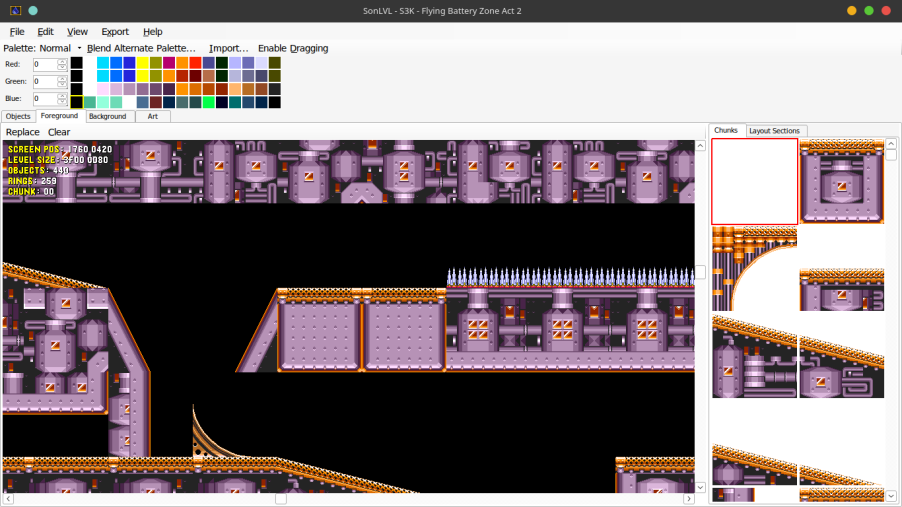
***thanks to "snowy_kirby", so i can make this easily*** *Sonic and Knuckles Disassembly = skdisasm* *turorial's folder path maybe has some idiot incorrect* *sorry for my bad english* before u want to make level, u need a PC. nah what ever winlator
**before start** using windows u need .NET4.5 and newer (or .NET4.8 ) if not then u need https://github.com/wine-mono/wine-mono/releases of last release's msi pack (wine is request)
**download** get the SonLVL in here:https://github.com/sonicretro/SonLVL (github) or https://info.sonicretro.org/SonLVL (sonicretro) then download https://github.com/sonicretro/skdisasm (as source codes)
**imready** create a new folder to manage ur works (optional:download a emu u like) for test faster now it is TIME to OPEN SonLVL
**uh really start now** head to the File button and then press the Open Button then head to (ur skdisasm's root)/SonLVL INI Files/SonLVL.ini(or other u want to edit but 'SonLVL.ini' is best ig) and head to the File button again then select Change level choose u fav level then start edit!
***debug*** setup ur emu in "Setup Emulator" then find ur emu now u can using F5 to run
***save*** ctrl+s or click "File" then "Save"
***make mod for S3AIR***
make ur mod folder,then add a folder called rawdata into ur mod folder
then create a json(any name) with this:
{
"